Apple MacBook Pro (14-inch, PROLED XDR Display, 2026)
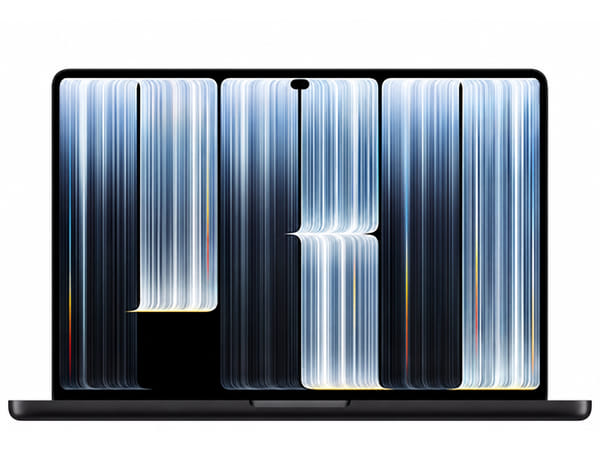








Apple MacBook Pro (14-inch, PROLED XDR Display, 2026)
This product is currently unavailable. Get an email the moment it’s back in stock.
Specifications
Certified Quality & Packaging
Apple MacBook Pro (14-inch, PROLED XDR Display, 2026)
Quick Facts
Feature | Details |
|---|---|
Launch Year | 2026 |
Display | 14.2-inch PROLED XDR tandem OLED touchscreen, 3024 × 1986 pixels, adaptive 10–120Hz ProMotion |
Processor | Apple M5 Pro with 15-core or 18-core CPU; M5 Max with 18-core CPU |
Graphics | M5 Pro: 16-core or 20-core GPU; M5 Max: 32-core or 40-core GPU |
Webcam | 12MP Center Stage camera with Desk View and 1080p video recording |
Battery | 72.6Wh lithium-polymer battery |
Charging | MagSafe 3 or USB-C; fast charging with a compatible 96W or higher USB PD power source |
RAM & Storage | M5 Pro: 24GB–64GB unified memory and 1TB–4TB SSD; M5 Max: 36GB–128GB and 2TB–16TB SSD; options depend on chip configuration |
Software & Network | macOS 27 at launch; Wi-Fi 7, Bluetooth 6 and Thread; no built-in cellular connection |
Weight | Approximately 1.38kg with M5 Pro; 1.40kg with M5 Max |
Overview
The Apple MacBook Pro with PROLED XDR Display is a compact laptop for creative work, software development and demanding multitasking. Its 14.2-inch tandem OLED touchscreen brings direct interaction to macOS, alongside a keyboard and Force Touch trackpad.
The display supports both P3 and Adobe RGB colour gamuts, making it particularly relevant to photography, design and video workflows. M5 Pro and M5 Max configurations provide different levels of processing, graphics and memory capacity, while Thunderbolt 5, HDMI and an SDXC slot support a desk setup without relying entirely on adapters.
The main buying decision is the configuration. Maximum memory and storage are tied to specific chip options, and the 14-inch display offers less working space than a larger laptop. Buyers using mainly documents, browsing and occasional editing may not need an M5 Max configuration.
Key Highlights
1. Tandem OLED Display with Touch Support
The PROLED XDR display combines a 3024 × 1986 resolution with adaptive refresh rates from 10Hz to 120Hz. It supports Multi-Touch gestures, P3 and Adobe RGB colour, and an optional nano-texture finish.
Why it matters:
Displays sharp text and detailed images.
Provides deep blacks for films and visual work.
Supports colour workflows for digital content and print.
Adds direct touch interaction alongside keyboard and trackpad controls.
Offers a nano-texture option for reducing glare in bright environments.
2. M5 Pro and M5 Max Options for Different Workloads
M5 Pro configurations offer 15-core or 18-core CPUs, while M5 Max pairs an 18-core CPU with more graphics cores. Both include dedicated media processing for supported video formats.
Why it matters:
Gives developers capacity for compilation and multitasking.
Supports photo editing and complex creative applications.
Offers larger GPU configurations for demanding graphics workloads.
Accelerates supported H.264, HEVC and ProRes processing.
Provides higher memory capacities for projects that need them.
3. Portable Design with Useful Built-In Connections
The M5 Pro model weighs approximately 1.38kg, with M5 Max bringing the weight to approximately 1.40kg. Both retain three Thunderbolt 5 ports, HDMI, an SDXC slot, MagSafe 3 and a headphone socket.
Why it matters:
Reduces the weight carried between home, work and meetings.
Connects compatible docks and external storage through Thunderbolt.
Provides direct HDMI connectivity for monitors and presentations.
Imports compatible camera cards through the SDXC slot.
Keeps USB-C ports available when charging through MagSafe.
Key Features Explained
Feature | Specification | Why It Matters |
|---|---|---|
Display | 14.2-inch tandem OLED, 3024 × 1986 | Provides detailed viewing in a portable laptop |
Refresh Rate | Adaptive 10–120Hz ProMotion | Supports smoother scrolling and responsive motion |
Brightness & Colour | Up to 1,000 nits sustained full-screen; 2,000 nits peak HDR or outdoor SDR; P3 and Adobe RGB | Supports HDR viewing and colour-managed creative work; peak brightness is not continuous full-screen brightness |
Touch & Surface | Multi-Touch gestures; standard or optional nano-texture glass | Adds direct interaction and a choice of display finish |
Processor & Graphics | M5 Pro: 15/16 or 18/20 CPU/GPU cores; M5 Max: 18/32 or 18/40 | Lets buyers match processing and graphics capacity to their applications |
Unified Memory | M5 Pro 16-core GPU: 24GB/48GB; M5 Pro 20-core GPU: 24GB/48GB/64GB; M5 Max 32-core GPU: 36GB; M5 Max 40-core GPU: 48GB/64GB/128GB | Makes the exact chip configuration important when choosing memory |
SSD Storage | M5 Pro: 1TB/2TB/4TB; M5 Max: 2TB/4TB/8TB/16TB | Provides different capacities for media libraries and project files |
External Displays | Up to three with M5 Pro; up to four with M5 Max | Supports larger desktop workspaces; supported combinations depend on resolution and refresh rate |
Ports | Three Thunderbolt 5, HDMI, SDXC, MagSafe 3 and 3.5mm audio | Connects common creative and office accessories |
Webcam & Audio | 12MP Center Stage with Desk View; six speakers and three microphones | Supports meetings, demonstrations and media playback |
Battery & Charging | 72.6Wh; fast charging with a compatible 96W or higher power source | Supports mobile work and charging through MagSafe or USB-C |
Wireless | Wi-Fi 7, Bluetooth 6 and Thread | Connects to compatible networks and wireless accessories |
Security & Input | Touch ID, backlit Magic Keyboard and Force Touch trackpad | Provides fingerprint authentication and familiar laptop controls |
Compare Related Models
Feature | MacBook Pro 14-inch PROLED XDR (2026) | MacBook Pro 14-inch M5 (2025) | MacBook Pro 14-inch M4 Pro (2024) |
|---|---|---|---|
Launch Year | 2026 | 2025 | 2024 |
Display Size | 14.2 inches | 14.2 inches | 14.2 inches |
Display Type | PROLED XDR tandem OLED | Liquid Retina XDR | Liquid Retina XDR |
Resolution | 3024 × 1986 | 3024 × 1964 | 3024 × 1964 |
Refresh Rate | Adaptive 10–120Hz | Adaptive up to 120Hz | Adaptive up to 120Hz |
Processor | M5 Pro or M5 Max | M5; 10-core CPU | M4 Pro; 12-core or 14-core CPU |
Graphics | 16-core/20-core GPU with M5 Pro; 32-core/40-core with M5 Max | 10-core GPU | 16-core or 20-core GPU |
Webcam | 12MP Center Stage with Desk View | 12MP Center Stage with Desk View | 12MP Center Stage with Desk View |
Battery | 72.6Wh | 72.4Wh | 72.4Wh |
Wired Charging | MagSafe 3/USB-C; fast charging with compatible 96W+ power source | MagSafe 3/USB-C; fast charging with compatible 96W+ power source | MagSafe 3/USB-C; fast charging with compatible 96W+ power source |
Storage | M5 Pro: 1TB–4TB; M5 Max: 2TB–16TB | 512GB–4TB | 512GB–4TB |
Network | Wi-Fi 7; Bluetooth 6 | Wi-Fi 6E; Bluetooth 5.3 | Wi-Fi 6E; Bluetooth 5.3 |
Weight | 1.38kg M5 Pro; 1.40kg M5 Max | 1.55kg | 1.60kg |
Unified Memory | Configuration-dependent, 24GB–128GB | 16GB, 24GB or 32GB | 24GB or 48GB |
Touchscreen | Yes | No | No |
Thunderbolt Ports | Three Thunderbolt 5 | Three Thunderbolt 4 | Three Thunderbolt 5 |
Which Model Should You Choose?
Model | Recommended For |
|---|---|
MacBook Pro 14-inch PROLED XDR (2026) | Creators who value OLED, touch interaction, lower weight and access to high-capacity M5 Max configurations |
MacBook Pro 14-inch M5 (2025) | Buyers who want an XDR display and MacBook Pro connectivity for productivity, coding and moderate creative workloads |
MacBook Pro 14-inch M4 Pro (2024) | Buyers who need a Pro-class processor and Thunderbolt 5, but can do without OLED and touch when a suitable listing offers better value |
Alternatives to the Apple MacBook Pro (14-inch, PROLED XDR Display, 2026)
If you are comparing before buying, you may also want to check these related SellUp Marketplace pages:
Apple MacBook Pro (14-inch, M5, 2025) — a same-size alternative for everyday work and moderate creative tasks.
Apple MacBook Pro (14-inch, M4 Pro, 2024) — an earlier Pro configuration with Thunderbolt 5 and a Liquid Retina XDR display.
Common Questions
Is the MacBook Pro 14-inch PROLED XDR good for everyday use?
Yes. It handles documents, browsing, meetings and multitasking, with additional capacity for creative applications. Buyers with lighter workloads may find a standard M5 MacBook Pro sufficient.
Does the MacBook Pro 14-inch PROLED XDR support 5G?
It does not have built-in 5G cellular connectivity. Away from Wi-Fi, you can use a compatible phone hotspot or another internet connection.
Is the MacBook Pro 14-inch PROLED XDR better than the MacBook Pro 14-inch M4 Pro?
It offers an OLED touchscreen, lower weight, newer wireless connectivity and M5 Pro or M5 Max configurations. The M4 Pro model still provides an XDR display and Thunderbolt 5. The upgrade is most relevant when the display changes or additional processing capacity benefit your work.
Does the MacBook Pro 14-inch PROLED XDR support wireless charging?
Apple specifies wired charging through MagSafe 3 or USB-C, rather than wireless charging. MagSafe 3 uses a magnetically attached cable.
Is the MacBook Pro 14-inch PROLED XDR water-resistant?
Apple does not list an IP water-resistance rating for this laptop. It should be kept away from liquids.
Is the MacBook Pro 14-inch PROLED XDR worth buying?
It is worth considering for mobile creative work where display quality, touch interaction and processing capacity matter. Choose the chip, memory and SSD together, because configuration limits differ. An earlier model may suit your needs when OLED and touch are not priorities.
Why Buy the Apple MacBook Pro (14-inch, PROLED XDR Display, 2026)?
This MacBook Pro suits photographers, designers, developers and video creators who want a portable laptop with an OLED touchscreen and extensive connectivity. Its lower weight makes frequent travel easier, while M5 Pro and M5 Max options accommodate different workloads. The main trade-offs are the compact working area and the need to select an appropriate memory and storage combination.
Compare Apple MacBook Pro (14-inch, PROLED XDR Display, 2026) listings on SellUp Marketplace to find the condition, storage size, and price that suits your budget.