
Lenovo Legion Go Z1
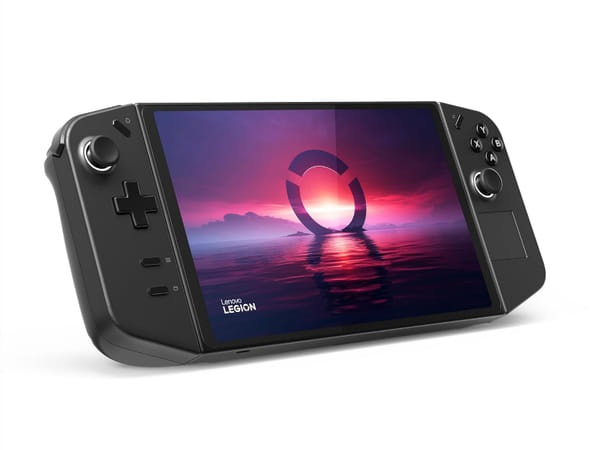








Lenovo Legion Go Z1
This product is currently unavailable. Get an email the moment it’s back in stock.
Specifications
Certified Quality & Packaging
Lenovo Legion Go Z1
Quick Facts
Item | Details |
|---|---|
Launch Year | 2024 |
Console Type | Handheld Gaming PC |
Display | 8.8-inch QHD+ LCD touchscreen, 2560 × 1600, 144Hz |
Processor | AMD Ryzen Z1 |
Storage | 512GB NVMe SSD |
TV Mode | Yes (via USB-C Dock or compatible hub) |
Estimated Play Time | Approx. 2–6 hours |
Controllers | Detachable Legion TrueStrike Controllers |
Weight | Approx. 854g |
Overview
The Lenovo Legion Go Z1 is designed for gamers who want a large-screen handheld gaming PC without paying for the higher-end Z1 Extreme model. Running Windows 11, it gives players access to Steam, Xbox Game Pass, Epic Games Store and other PC gaming platforms from a single device.
Powered by the AMD Ryzen Z1 processor with RDNA 3 graphics, the Legion Go Z1 delivers smooth performance for indie games, esports titles and many AAA games with the appropriate graphics settings. It features a large 8.8-inch QHD+ touchscreen with a 144Hz refresh rate, 512GB SSD storage and detachable Legion TrueStrike controllers.
The Legion Go Z1 supports thousands of PC games, including Forza Horizon 5, EA Sports FC 25, Diablo IV, Hades II, Palworld and many Steam titles. It also supports external displays, keyboards, mice and other PC accessories via USB-C.
Key Highlights
1. Large 8.8-inch QHD+ Display
The Legion Go features one of the largest displays available on a handheld gaming PC.
Why it matters:
Larger viewing area
Sharper visuals with QHD+ resolution
144Hz refresh rate for smoother gameplay
Excellent for strategy and RPG games
More immersive gaming experience
2. Detachable Controllers
The Legion TrueStrike controllers can be detached from the console for more flexible gameplay.
Why it matters:
More comfortable tabletop gaming
Easier multiplayer gaming
Built-in FPS Mode support
Similar flexibility to a Nintendo Switch
Suitable for different gaming styles
3. Windows Gaming Platform
Unlike traditional consoles, the Legion Go runs Windows 11.
Why it matters:
Access multiple game launchers
Compatible with Steam and Xbox Game Pass
Install PC software
Supports mods and productivity apps
Functions like a portable Windows PC
Key Features Explained
Feature | Specification | Why It Matters |
|---|---|---|
Console Type | Handheld gaming PC | Combines portable gaming with Windows PC flexibility |
Display | 8.8-inch QHD+ LCD touchscreen, 2560 × 1600, 144Hz | Delivers sharp visuals and smooth gameplay |
Processor | AMD Ryzen Z1 | Provides solid performance for modern PC games |
Graphics | AMD Radeon RDNA 3 Graphics | Supports modern AAA and indie games |
Storage | 512GB NVMe SSD | Fast game loading and ample storage |
Expandable Storage | microSD card | Easily increase storage capacity |
Estimated Play Time | Approx. 2–6 hours | Battery life varies depending on game settings |
Controllers | Detachable Legion TrueStrike Controllers | Flexible handheld and tabletop gaming |
Operating System | Windows 11 | Supports multiple PC gaming platforms |
Connectivity | Wi-Fi 6E, Bluetooth 5.3, Dual USB-C | Connect accessories, docks and external displays |
Compare Handheld Gaming PCs
Feature | Legion Go Z1 | Legion Go Z1 Extreme | Steam Deck OLED | ASUS ROG Ally Z1 |
|---|---|---|---|---|
Launch Year | 2024 | 2023 | 2023 | 2023 |
Console Type | Handheld Gaming PC | Handheld Gaming PC | Handheld Gaming PC | Handheld Gaming PC |
Display | 8.8-inch QHD+, 144Hz | 8.8-inch QHD+, 144Hz | 7.4-inch OLED, 90Hz | 7-inch FHD, 120Hz |
Processor | AMD Ryzen Z1 | AMD Ryzen Z1 Extreme | AMD Zen 2 + RDNA 2 | AMD Ryzen Z1 |
Storage | 512GB SSD | 512GB / 1TB SSD | 512GB / 1TB SSD | 512GB SSD |
TV Mode | Yes | Yes | Yes | Yes |
Estimated Play Time | Approx. 2–6 hours | Approx. 2–7 hours | Approx. 3–12 hours | Approx. 2–6 hours |
Weight | Approx. 854g | Approx. 854g | Approx. 640g | Approx. 608g |
Which Handheld Gaming PC Should You Choose?
Model | Recommended For |
|---|---|
Legion Go Z1 | Buyers who want a large-screen Windows handheld at a lower price |
Legion Go Z1 Extreme | Gamers who want higher gaming performance |
Steam Deck OLED | Players focused on Steam and battery life |
ASUS ROG Ally Z1 | Buyers looking for a lighter Windows handheld |
Alternatives to the Lenovo Legion Go Z1
If you are comparing before buying, you may also want to check these related SellUp Marketplace pages:
Common Questions
Is the Lenovo Legion Go Z1 worth buying?
Yes. The Legion Go Z1 is a good choice for gamers who want a Windows handheld with a large 8.8-inch display at a lower price than the Z1 Extreme model. It performs well for indie games, esports titles and many modern games with adjusted graphics settings.
Is the Legion Go Z1 slower than the Z1 Extreme?
Yes. The Ryzen Z1 Extreme has a significantly more powerful integrated GPU, making it better suited for demanding AAA games. The Ryzen Z1 model is more suitable for lighter games or lower graphics settings.
Can the Legion Go Z1 play Steam games?
Yes. Since it runs Windows 11, it supports Steam, Xbox Game Pass, Epic Games Store, Battle.net, Ubisoft Connect and many other PC game launchers.
Can I connect the Legion Go Z1 to a TV?
Yes. The Legion Go supports external displays through USB-C using a compatible dock or USB-C hub.
Can I upgrade the storage?
Yes. The Legion Go supports microSD cards and the internal SSD can also be upgraded by experienced users.
Is the Legion Go Z1 suitable for beginners?
Yes. Windows provides access to familiar PC gaming platforms, although first-time PC gamers may experience a slightly steeper learning curve than traditional consoles like the Nintendo Switch or PlayStation.
Why Buy the Lenovo Legion Go Z1?
The Lenovo Legion Go Z1 is an excellent choice for buyers who want a premium Windows handheld with a large high-resolution display without paying for the higher-priced Z1 Extreme model. Its detachable controllers, versatile Windows platform and support for multiple PC gaming stores make it one of the most flexible handheld gaming PCs available.
When buying a used Lenovo Legion Go Z1, inspect the display for scratches or dead pixels, test both detachable controllers, thumbsticks, triggers, buttons and FPS Mode, verify the touchscreen, speakers, Wi-Fi, Bluetooth, USB-C ports and microSD card reader, and check the battery condition. Also ensure Windows has been reset and any previous user accounts have been removed.
Compare Lenovo Legion Go Z1 listings on SellUp Marketplace to find the condition, storage capacity, accessories and price that suit your budget.